EXULTANT COMMERCE · FREE TOOLS
Free Pinterest product feed auditor
Check a Pinterest catalog export for missing product details, repeated IDs and common formatting issues. Use the report to organize data fixes before updating your catalog.
EXULTANT COMMERCE · FREE TOOLS
← All toolsPinterest feed auditor
Find missing retail feed fields and inconsistent product data.
Your results
Add your data and run the tool to view results.
These are basic checks on the data you provide, not live account diagnostics or a guarantee of platform approval. Review market, category and Shop requirements separately.
Feed quality visual guides
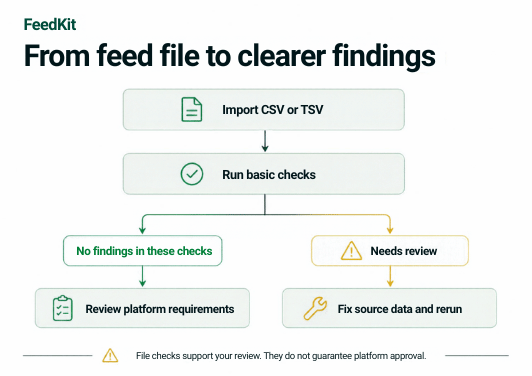

How to review your Pinterest feed
- Upload or paste a CSV or TSV export with headers and an id column.
- Review missing fields and formatting findings, including price and URL syntax.
- Export the findings, update the source data and check Pinterest diagnostics after your feed is processed.
Understand the results
These are basic data checks, not a complete Pinterest specification or policy audit. The tool does not fetch image URLs or confirm merchant eligibility. Use up to 10 MB and 20,000 records.