EXULTANT COMMERCE · FREE TOOLS
Free ecommerce and product feed tools
Free tools for checking product feeds, planning campaigns and setting up conversion tracking. Audit a Google Merchant Center, Meta, Pinterest or TikTok feed, validate GTINs, compare two feed exports or work out your break-even ROAS. Feed files are processed in your browser.
NEW · WEBSITE MEASUREMENT
Website conversion tracking auditor
Audit your website, discover important conversions and get setup instructions for purchases, enquiries, bookings or custom events. Supports Shopify, WooCommerce, WordPress, Wix, Webflow and custom websites.
Small tools. Better product data.
Audit feeds, check listings and understand campaign performance. Files are processed in your browser.
12 tools
GMC feed auditor
Check core attributes, duplicate IDs, price formatting and Google title limits.
Open tool →MetaMeta catalog auditor
Review core catalog fields, identifiers and formatting for your Meta feed.
Open tool →PinterestPinterest feed auditor
Find missing retail feed fields and inconsistent product data.
Open tool →TikTokTikTok catalog auditor
Check common advertising catalog fields before submitting your feed.
Open tool →AmazonAmazon listing auditor
Review title length, repeated words and missing listing copy.
Open tool →Google AdsROAS & profit calculator
Calculate return on ad spend, break-even ROAS and contribution after ads.
Open tool →Feed essentialsGTIN validator
Check GTIN-8, UPC, EAN and GTIN-14 lengths and check digits.
Open tool →Feed essentialsProduct title builder
Combine brand, product and variant details into a consistent title.
Open tool →Feed essentialsDescription cleaner
Remove HTML and normalize whitespace in product descriptions.
Open tool →Feed essentialsDuplicate ID checker
Find repeated product IDs in CSV or TSV exports.
Open tool →Feed essentialsFeed comparison
Find added, removed and changed products across two exports.
Open tool →Google AdsCampaign URL builder
Create campaign URLs with consistent UTM parameters.
Open tool →No matching tools. Try a shorter search.
Feed quality visual guides

Which tool should you use?
Check a channel feed before you upload it
Review missing fields, duplicate IDs and formatting for one platform.
Fix individual product attributes
Prepare identifiers, titles and descriptions, then confirm what changed.
Review listings and plan campaigns
Check Amazon listing copy and the numbers behind your ad spend.
What the results mean
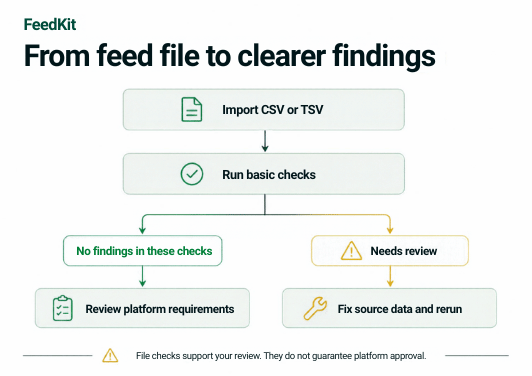
The auditors run basic checks on the data you provide. They do not connect to your merchant accounts or determine whether a product is approved. Treat the findings as a list of things to review against each platform’s current requirements.
Common questions
Are these tools free?
Yes. These tools are free to use.
Is my feed data uploaded to your server?
Feed files and pasted feed data are processed in your browser. The tracking auditor sends public URLs and pasted website source to its audit service for analysis. The Suggest a tool form sends your message to us so we can review the request.
Which file formats and sizes work?
The feed tools accept CSV or TSV files with a header row, up to 10 MB and 20,000 records. You can also paste data directly.
Will a clean audit get my products approved?
No. Each platform makes its own approval decisions. A clean result means these checks found nothing to fix, not that every requirement is met.
Need help fixing what you find?
If an audit turns up more than you want to fix by hand, we can take it on.